
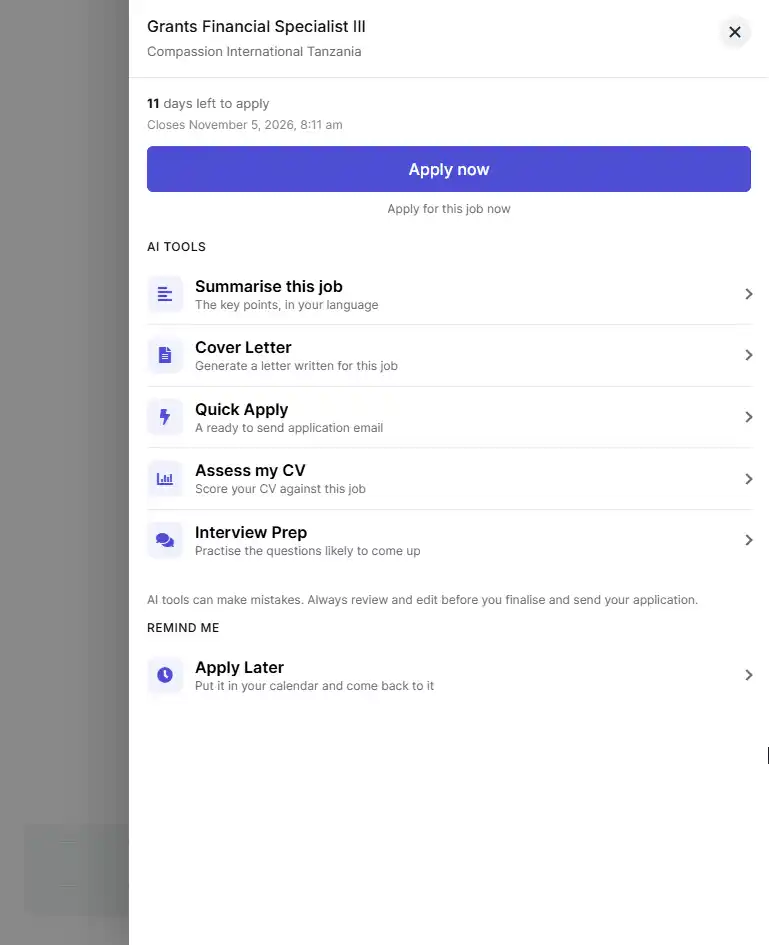
AjiraChat AI tools help you prepare a strong application without leaving the job page. You can summarise a job, write a cover letter, draft an application email, check your CV and prepare for the interview. Each tool works on the job you are viewing, so you don’t need to copy the job description anywhere.
Before You Start
- Log in to your Zoom Tanzania candidate account. The AI tools only work for job seekers who are logged in.
- Complete your profile and upload your CV. The tools use your profile and CV to write about your real experience. The more complete your profile, the better the results.
How to Open the AI Tools
- Open the job you want to apply for.
- Click “Apply Faster”.
- Under AI Tools, click the tool you want to use.
- AjiraChat opens next to the job, ready to work on it.
Summarise This Job
Use this when a job description is long or hard to understand. Choose English or Kiswahili, and AjiraChat explains what the role involves, what the employer requires and anything you should watch out for. You can then ask AjiraChat more questions about the job in the same chat.
Cover Letter
AjiraChat writes a cover letter for this job using the details in your profile.
- Choose English or Kiswahili.
- Click “Generate Cover Letter”.
- Read the letter. Click “Save & Open Editor” to change anything.
- Copy the letter or click “Save as PDF” to download it.
Your latest letter is saved, so you can come back to it later.
Quick Apply
Use this for jobs that accept applications by email. AjiraChat writes the application email for you.
- Choose English or Kiswahili and click “Generate”.
- Check that the employer’s email address shown is correct.
- Read the email and change anything that doesn’t sound like you.
- Note the documents listed. The employer asked for them, so attach them to your email.
- Click “Send”. Your email app opens with everything filled in.
Nothing is sent automatically. The email only goes out when you send it from your email app.
Assess My CV
This checks how well your CV matches the job before you apply. AjiraChat uses the CV on your profile. If you don’t have one, click “Upload CV & Assess” and upload a PDF, DOC or DOCX file. Your CV is saved to your profile and is never shared publicly.
You get:
- A match score out of 100.
- Strengths – what in your CV fits the job.
- Gaps – what the employer wants that your CV doesn’t show.
- Suggestions – lines you can add to your CV to close those gaps.
- Formatting tips – changes that help employer systems read your CV correctly.
If your score is high, you can go straight to writing your cover letter.
Interview Prep
Choose English or Kiswahili and click “Generate Interview Prep”. AjiraChat gives you 6 to 8 questions the panel is likely to ask for this job. For each question you get:
- Why the panel is likely to ask it.
- A sample answer based on the experience in your CV.
- A short tip on what to say or avoid.
You also get a few questions you can ask the panel at the end of the interview. Your prep pack is saved, so you can practise again before the day.
Important to Know
- Each tool has a daily limit. If you reach it, you can use the tool again tomorrow.
- AI can make mistakes. Read and correct everything before you send your application.
Pro Tip
Run Assess My CV first. Add the suggested lines to your CV, then write your cover letter. Your letter will be stronger because it uses your updated CV.