
To apply for jobs on Zoom Tanzania, visit the ZoomTanzania Jobs Portal and use the search bar to find relevant roles. Click on a vacancy that matches your skills, read the requirements carefully, and select the apply button to submit your application and resume.
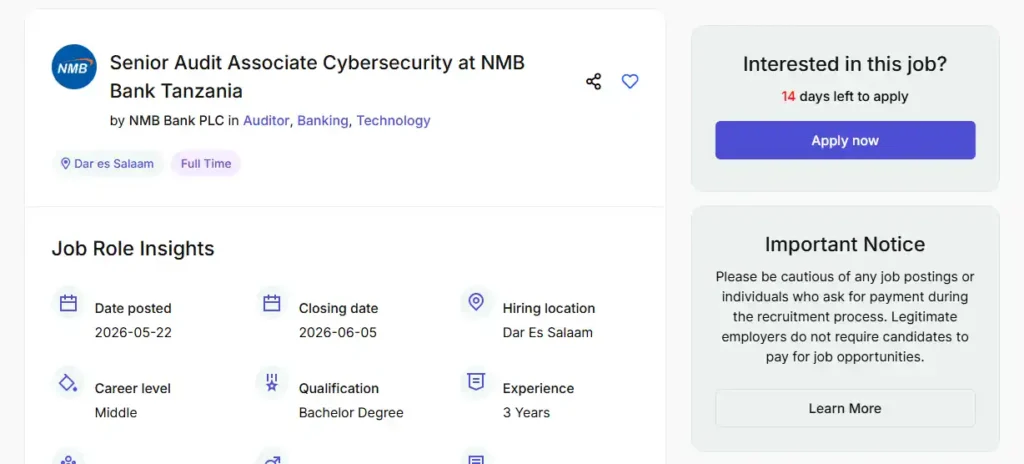
Step-by-Step Application Process
- Browse Vacancies: Go to the official ZoomTanzania platform and click on the “Jobs” section.
- Filter Your Search: Use the search filters (location, job category, and salary expectations) to narrow down the opportunities in your area.
- Review Requirements: Click on any specific job title (e.g., in Banking, Administration, or ICT) to read the full job description, experience level, and application deadlines.
- Submit Application:
- Apply Direct: Many listings have an integrated application form directly on the site where you can upload your CV and cover letter.
- External Links: Some employers will redirect you to their official company website or an external portal (such as an applicant tracking system) to finalize your application.
Tips for Success
- Create an Account: Registering as a job seeker on the portal allows you to save job postings and manage your applications efficiently.
- Tailor Your Resume: Ensure your CV is updated in PDF or Word format and explicitly highlights the skills requested in the job description.
- Follow Up: Note the contact details or application links provided in the job post to follow up if necessar